Legal Disclaimer: The resource assets in this website may include abbreviated and/or legacy terminology for HPE Aruba Networking products. See www.arubanetworks.com for current and complete HPE Aruba Networking product lines and names.
Joining a Policy Manager Server to an Active Directory Domain
When joining an Active Directory Microsoft Active Directory. The directory server that stores information about a variety of things, such as organizations, sites, systems, users, shares, and other network objects or components. It also provides authentication and authorization mechanisms, and a framework within which related services can be deployed. domain and doing PEAPv0+MSCHAPv2 authentication, Policy Manager negotiates and uses the highest Server Message Block (SMB Server Message Block or Small and Medium Business. Server Message Block operates as an application-layer network protocol mainly used for providing shared access to files, printers, serial ports, and for miscellaneous communications between the nodes on a network. ) protocol version that is supported by the Policy Manager server. Policy Manager supports SMBv1, v2, and v3.
A one-time procedure to join Policy Manager to the domain must be performed from an account that has the ability to join a computer to the domain; if you are unsure whether the administrator account has the ability to do so, check with your Windows administrator.
Why does Policy Manager need to join Active Directory Microsoft Active Directory. The directory server that stores information about a variety of things, such as organizations, sites, systems, users, shares, and other network objects or components. It also provides authentication and authorization mechanisms, and a framework within which related services can be deployed. to perform EAP-PEAP EAP–Protected EAP. A widely used protocol for securely transporting authentication data across a network (tunneled).-MS-CHAPv2 Microsoft Challenge Handshake Authentication Protocol version 2. MS-CHAPv2 is an enhanced version of the MS-CHAP protocol that supports mutual authentication. authentication for 802.1x? Policy Manager needs to be joined to Active Directory Microsoft Active Directory. The directory server that stores information about a variety of things, such as organizations, sites, systems, users, shares, and other network objects or components. It also provides authentication and authorization mechanisms, and a framework within which related services can be deployed. because when performing authentication for a client using EAP-PEAP EAP–Protected EAP. A widely used protocol for securely transporting authentication data across a network (tunneled).-MS-CHAPv2 Microsoft Challenge Handshake Authentication Protocol version 2. MS-CHAPv2 is an enhanced version of the MS-CHAP protocol that supports mutual authentication., only the password hashes supplied by the user are used to authenticate against Active Directory Microsoft Active Directory. The directory server that stores information about a variety of things, such as organizations, sites, systems, users, shares, and other network objects or components. It also provides authentication and authorization mechanisms, and a framework within which related services can be deployed.. This is done using NT LAN Local Area Network. A LAN is a network of connected devices within a distinct geographic area such as an office or a commercial establishment and share a common communications line or wireless link to a server. Manager (NTLM) authentication, which requires Active Directory Microsoft Active Directory. The directory server that stores information about a variety of things, such as organizations, sites, systems, users, shares, and other network objects or components. It also provides authentication and authorization mechanisms, and a framework within which related services can be deployed. domain membership.
If you need to authenticate users that belong to multiple Active Directory Microsoft Active Directory. The directory server that stores information about a variety of things, such as organizations, sites, systems, users, shares, and other network objects or components. It also provides authentication and authorization mechanisms, and a framework within which related services can be deployed. forests or domains in your network, and there is no trust relationship between these entities, then you must join Policy Manager to each of these untrusting forests or domains.
|
|
You do not need to join Policy Manager to multiple domains belonging to the same Active Directory Microsoft Active Directory. The directory server that stores information about a variety of things, such as organizations, sites, systems, users, shares, and other network objects or components. It also provides authentication and authorization mechanisms, and a framework within which related services can be deployed. forest, because a one-way trust relationship exists between these domains. In this case, you should join CPPM to the root domain. |
About the Domain Controller
A domain is defined as a logical group of network objects (computers, users, and devices) that share the same Active Directory Microsoft Active Directory. The directory server that stores information about a variety of things, such as organizations, sites, systems, users, shares, and other network objects or components. It also provides authentication and authorization mechanisms, and a framework within which related services can be deployed. database. The domain controller is the Microsoft Active Directory Microsoft Active Directory. The directory server that stores information about a variety of things, such as organizations, sites, systems, users, shares, and other network objects or components. It also provides authentication and authorization mechanisms, and a framework within which related services can be deployed. server responsible for responding to requests for authentication from users and computer accounts (for example, logging in and checking permissions) within the Windows Server domain. The Active Directory Microsoft Active Directory. The directory server that stores information about a variety of things, such as organizations, sites, systems, users, shares, and other network objects or components. It also provides authentication and authorization mechanisms, and a framework within which related services can be deployed. server contains the domain controller.
It’s common for an Active Directory Microsoft Active Directory. The directory server that stores information about a variety of things, such as organizations, sites, systems, users, shares, and other network objects or components. It also provides authentication and authorization mechanisms, and a framework within which related services can be deployed. domain controller to function as a DNS Domain Name System. A DNS server functions as a phone book for the intranet and Internet users. It converts human-readable computer host names into IP addresses and IP addresses into host names. It stores several records for a domain name such as an address 'A' record, name server (NS), and mail exchanger (MX) records. The Address 'A' record is the most important record that is stored in a DNS server, because it provides the required IP address for a network peripheral or element. server. Active Directory Microsoft Active Directory. The directory server that stores information about a variety of things, such as organizations, sites, systems, users, shares, and other network objects or components. It also provides authentication and authorization mechanisms, and a framework within which related services can be deployed. domain controllers can also be LDAP Lightweight Directory Access Protocol. LDAP is a communication protocol that provides the ability to access and maintain distributed directory information services over a network. servers, as well as perform any number of additional functions that are loaded on the same server. By default, a domain controller stores one domain directory partition consisting of information about the domain in which it is located, plus the schema and configuration directory partitions for the entire forest.
Synchronizing the Cluster Date and Time with the NTP Server
Assuming that this Policy Manager server has never been joined to the Active Directory Microsoft Active Directory. The directory server that stores information about a variety of things, such as organizations, sites, systems, users, shares, and other network objects or components. It also provides authentication and authorization mechanisms, and a framework within which related services can be deployed. domain before, first make sure that the date and time are correct and in sync on both the Policy Manager server and the Active Directory Microsoft Active Directory. The directory server that stores information about a variety of things, such as organizations, sites, systems, users, shares, and other network objects or components. It also provides authentication and authorization mechanisms, and a framework within which related services can be deployed. domain controller that you will use for the join domain operation.
|
|
The option to change the date and time for the cluster is available only on the Publisher node. Subscriber nodes in a cluster will synchronize the date and time from the Publisher node. |
To synchronize the date and time on the nodes in a cluster with an NTP Network Time Protocol. NTP is a protocol for synchronizing the clocks of computers over a network. (Network Time Protocol) server:
1. Log in to the Publisher node.
2. Navigate to the page.
3. Select the link. The dialog opens to the tab.
Figure 1 Confirming NTP Server Synchronization
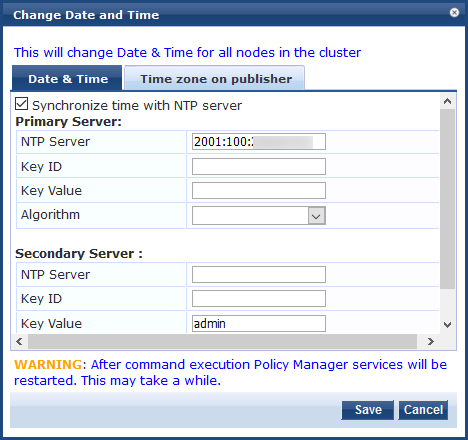
4. Specify the parameters as described in the following table:
|
Parameter |
Description |
|
Synchronize time with NTP Network Time Protocol. NTP is a protocol for synchronizing the clocks of computers over a network. server |
To synchronize with a Network Time Protocol (NTP Network Time Protocol. NTP is a protocol for synchronizing the clocks of computers over a network.) server, enable this check box (enabled by default). You can also specify the date and time for the cluster manually by disabling the check box and entering the current date and time in the dialog provided: |
|
|
|
|
Specify the IP address or host name for the Primary NTP Network Time Protocol. NTP is a protocol for synchronizing the clocks of computers over a network. server and the Secondary NTP Network Time Protocol. NTP is a protocol for synchronizing the clocks of computers over a network. server. The IP address can be an IPv4 or IPv6 address. Users should be aware that ClearPass can time sync with any of the configured NTP Network Time Protocol. NTP is a protocol for synchronizing the clocks of computers over a network. servers in any order. It does not need to prefer the primary NTP Network Time Protocol. NTP is a protocol for synchronizing the clocks of computers over a network. server first and then the secondary as per configuration. |
|
|
Key ID |
The is a number that specifies the index for key values. The value can be from 1 to 65534 inclusive. For authentication to succeed, typically an NTP Network Time Protocol. NTP is a protocol for synchronizing the clocks of computers over a network. client and server have to trust the same key ID and key value pair. |
|
Key Value |
The is a form of shared secret, which both the client and the Policy Manager server use for authenticating NTP Network Time Protocol. NTP is a protocol for synchronizing the clocks of computers over a network. messages. The can be: Up to 20-character printable ASCII American Standard Code for Information Interchange. An ASCII code is a numerical representation of a character or an action. string Up to 40-character hex value When entering an ASCII American Standard Code for Information Interchange. An ASCII code is a numerical representation of a character or an action. string for the , note that it cannot contain the following characters: (ampersand) (semicolon) (grave accent) (pipe) (left angle bracket) (right angle bracket) (left parenthesis) (right parenthesis) The ASCII American Standard Code for Information Interchange. An ASCII code is a numerical representation of a character or an action. string must start and end with one of the following characters: (hyphen) (apostrophe) (quotation mark) |
|
Algorithm |
Select one of the following encryption types: SHA1 In FIPS Federal Information Processing Standards. FIPS refers to a set of standards that describe document processing, encryption algorithms, and other information technology standards for use within non-military government agencies, and by government contractors and vendors who work with these agencies. mode, only the SHA1 hashing algorithm is supported. |
5. Click
6. Return to the page by clicking .
7. Compare the clock time displayed at the bottom of the Policy Manager page against the clock time on the Active Directory Microsoft Active Directory. The directory server that stores information about a variety of things, such as organizations, sites, systems, users, shares, and other network objects or components. It also provides authentication and authorization mechanisms, and a framework within which related services can be deployed. server.
|
|
The maximum allowed clock skew between the Policy Manager server and the Active Directory Microsoft Active Directory. The directory server that stores information about a variety of things, such as organizations, sites, systems, users, shares, and other network objects or components. It also provides authentication and authorization mechanisms, and a framework within which related services can be deployed. server is . |
8. If the time on the two systems doesn't exceed the clock skew limit, then proceed.
Restarting Services
Once you have saved the configuration, you must restart Policy Manager services.
|
|
The Audit Viewer (> ) tracks NTP Network Time Protocol. NTP is a protocol for synchronizing the clocks of computers over a network. configuration changes. |
To restart Policy Manager services:
1. Navigate to > > .
2. Select the Policy Manager Publisher node.
3. From the page, select the tab.
Figure 2 Restarting Stopped Services

4. From the column, click for each service that needs to be restarted.
For each restarted service, the button is changed to .
Specifying the Time Zone on the Publisher Node
To specify the time zone on the Publisher node:
1. Click the tab.
Figure 3 Setting the Time Zone on the Publisher

The time zones are listed in alphabetical order.
2. Select the time zone where the Publisher node resides, then click .
|
|
This option is available only on the Publisher. To set the time zone on a Subscriber node, select the specific server and set the time zone from the server-specific page. |
Joining an Active Directory Domain
You can join Policy Manager to an Active Directory Microsoft Active Directory. The directory server that stores information about a variety of things, such as organizations, sites, systems, users, shares, and other network objects or components. It also provides authentication and authorization mechanisms, and a framework within which related services can be deployed. (AD) domain to authenticate users and computers that are members of an Active Directory Microsoft Active Directory. The directory server that stores information about a variety of things, such as organizations, sites, systems, users, shares, and other network objects or components. It also provides authentication and authorization mechanisms, and a framework within which related services can be deployed. domain. If you join Policy Manager to an Active Directory Microsoft Active Directory. The directory server that stores information about a variety of things, such as organizations, sites, systems, users, shares, and other network objects or components. It also provides authentication and authorization mechanisms, and a framework within which related services can be deployed. domain, it creates an account for the Policy Manager node in the Active Directory Microsoft Active Directory. The directory server that stores information about a variety of things, such as organizations, sites, systems, users, shares, and other network objects or components. It also provides authentication and authorization mechanisms, and a framework within which related services can be deployed. database.
Users can then authenticate into the network using 802.1X 802.1X is an IEEE standard for port-based network access control designed to enhance 802.11 WLAN security. 802.1X provides an authentication framework that allows a user to be authenticated by a central authority. and EAP Extensible Authentication Protocol. An authentication protocol for wireless networks that extends the methods used by the PPP, a protocol often used when connecting a computer to the Internet. EAP can support multiple authentication mechanisms, such as token cards, smart cards, certificates, one-time passwords, and public key encryption authentication. methods, such as PEAP Protected Extensible Authentication Protocol. PEAP is a type of EAP communication that addresses security issues associated with clear text EAP transmissions by creating a secure channel encrypted and protected by TLS.-MSCHAPv2, with their own their own Active Directory Microsoft Active Directory. The directory server that stores information about a variety of things, such as organizations, sites, systems, users, shares, and other network objects or components. It also provides authentication and authorization mechanisms, and a framework within which related services can be deployed. credentials.
If you need to authenticate users belonging to multiple Active Directory Microsoft Active Directory. The directory server that stores information about a variety of things, such as organizations, sites, systems, users, shares, and other network objects or components. It also provides authentication and authorization mechanisms, and a framework within which related services can be deployed. forests or domains in your network, and there is no trust relationship between these entities, then you must join Policy Manager to each of these untrusted forests or domains.
|
|
Policy Manager is not required to join multiple domains belonging to the same Active Directory forest because a one-way trust relationship exists between those domains. In this case, Policy Manager can join the root domain. |
Policy Manager can join or leave an Active Directory Microsoft Active Directory. The directory server that stores information about a variety of things, such as organizations, sites, systems, users, shares, and other network objects or components. It also provides authentication and authorization mechanisms, and a framework within which related services can be deployed. domain by using the following two buttons in the page > tab:
Join Domain: Click to join this Policy Manager appliance to an Active Directory Microsoft Active Directory. The directory server that stores information about a variety of things, such as organizations, sites, systems, users, shares, and other network objects or components. It also provides authentication and authorization mechanisms, and a framework within which related services can be deployed. domain. Password servers can be configured after Policy Manager is successfully joined. For more information on adding a password server, see Manually Configuring Active Directory Password Servers below.
Leave Domain: If the server is already part of multiple Active Directory Microsoft Active Directory. The directory server that stores information about a variety of things, such as organizations, sites, systems, users, shares, and other network objects or components. It also provides authentication and authorization mechanisms, and a framework within which related services can be deployed. domains, click to disassociate this Policy Manager appliance from an Active Directory Microsoft Active Directory. The directory server that stores information about a variety of things, such as organizations, sites, systems, users, shares, and other network objects or components. It also provides authentication and authorization mechanisms, and a framework within which related services can be deployed. domain (for details, see Disassociating a Policy Manager Server From an Active Directory Domain).
To Join an Active Directory Domain
To join a Policy Manager server to an Active Directory Microsoft Active Directory. The directory server that stores information about a variety of things, such as organizations, sites, systems, users, shares, and other network objects or components. It also provides authentication and authorization mechanisms, and a framework within which related services can be deployed. domain:
1. In the screen, click the that you want to join to the domain.
The screen for the selected server opens.
Figure 4 Join AD Domain Option for Selected Policy Manager Server
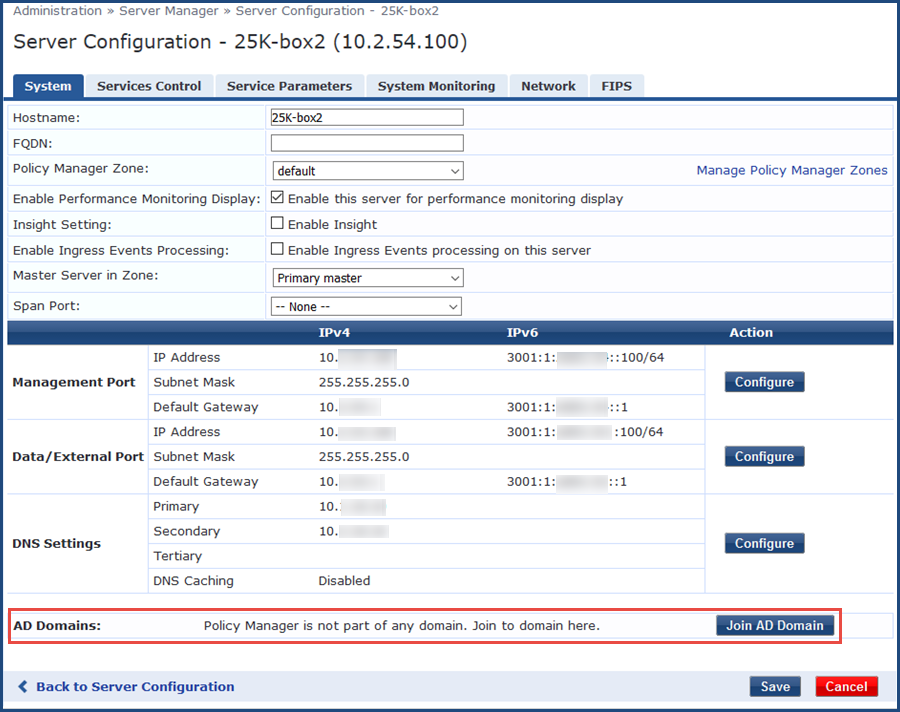
2. Click .
The dialog opens.
Figure 5 Join AD Domain Dialog
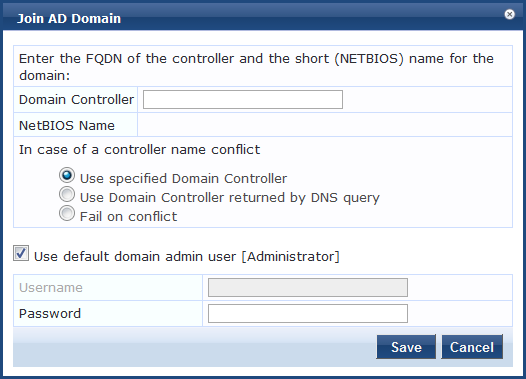
3. Specify the parameters as described in the following table.
Figure 6 shows that Policy Manager found the NetBIOS Network Basic Input/Output System. A program that lets applications on different computers communicate within a LAN. domain name and populated the field with the correct name.
Figure 6 Entering the Domain Controller FQDN
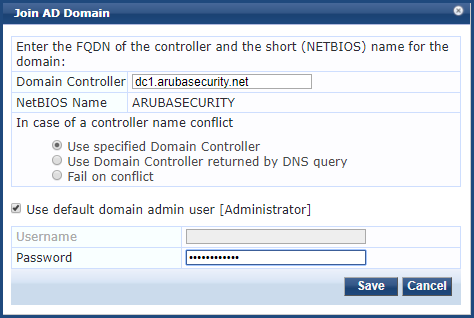
4. Click .
The screen opens.
During the joining process, the screen displays the messages "Checking whether <name> domain controller is co-located with this ClearPass Policy Manager server." and then “Adding host to AD domain,” The screen displays status during the joining process.
When the joining process completes successfully, you see the message “Added host to the domain.”
If Policy Manager cannot identify the domain controller because Active Directory Microsoft Active Directory. The directory server that stores information about a variety of things, such as organizations, sites, systems, users, shares, and other network objects or components. It also provides authentication and authorization mechanisms, and a framework within which related services can be deployed. has not been configured with site information, this form displays the warning "Unable to identify which Active Directory Microsoft Active Directory. The directory server that stores information about a variety of things, such as organizations, sites, systems, users, shares, and other network objects or components. It also provides authentication and authorization mechanisms, and a framework within which related services can be deployed. site this Policy Manager server is located in. Authentications might fail or be impacted if the selected domain controller is not co-located."
If Policy Manager determines that you are not joining the closest domain controller, the form displays both a warning message and a button that you can use to find the closest domain controllers.
5. To display a list of available controllers, click the button .
You can then select a controller from the available list, or proceed with the domain Controller you originally selected.
Figure 7 Policy Manager Server Added to the Active Directory Domain

The status screen indicates that the services have restarted. As shown in Figure 7, the final INFO line states that the selected Policy Manager server joined the domain.
6. Click .
You return to the page, and it now shows that the Policy Manager server is joined to the domain.
Now that the Policy Manager server has joined the domain, the server can authenticate users with Active Directory Microsoft Active Directory. The directory server that stores information about a variety of things, such as organizations, sites, systems, users, shares, and other network objects or components. It also provides authentication and authorization mechanisms, and a framework within which related services can be deployed..
Figure 8 Policy Manager Server Joined to Domain
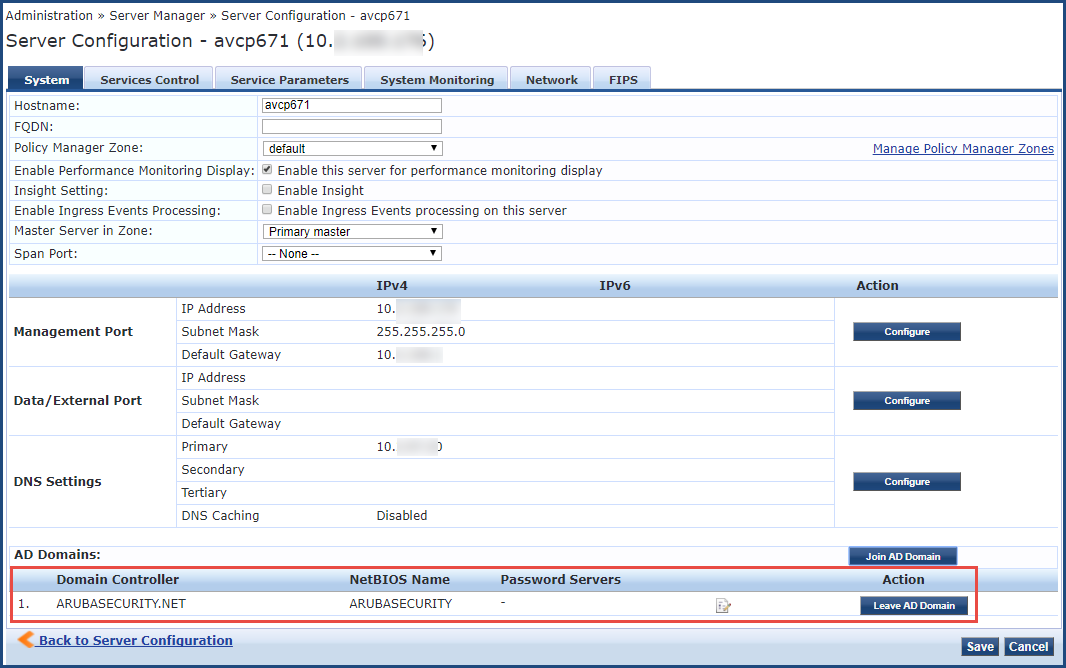
Now that the Policy Manager server has joined the domain, the server can authenticate users with Active Directory Microsoft Active Directory. The directory server that stores information about a variety of things, such as organizations, sites, systems, users, shares, and other network objects or components. It also provides authentication and authorization mechanisms, and a framework within which related services can be deployed..
About the Authentication Source and the Authorization Process
During the NT LAN Local Area Network. A LAN is a network of connected devices within a distinct geographic area such as an office or a commercial establishment and share a common communications line or wireless link to a server. Manager authentication process, Policy Manager queries Active Directory Microsoft Active Directory. The directory server that stores information about a variety of things, such as organizations, sites, systems, users, shares, and other network objects or components. It also provides authentication and authorization mechanisms, and a framework within which related services can be deployed. for a suitable domain controller to use to handle the authentication.
Please note that when used with 802.1x EAP-PEAP EAP–Protected EAP. A widely used protocol for securely transporting authentication data across a network (tunneled).-MSCHAPv2 services, the authentication process is separate from the Active Directory Microsoft Active Directory. The directory server that stores information about a variety of things, such as organizations, sites, systems, users, shares, and other network objects or components. It also provides authentication and authorization mechanisms, and a framework within which related services can be deployed. authentication source in Policy Manager, which in this context only handles authorization.
Optionally, you can configure a list of domain controllers to be used for MSCHAPv2 authentication, as described in the next section, Manually Configuring Active Directory Password Servers.
If you do not specify this list of domain controllers, all available domain controllers obtained from DNS Domain Name System. A DNS server functions as a phone book for the intranet and Internet users. It converts human-readable computer host names into IP addresses and IP addresses into host names. It stores several records for a domain name such as an address 'A' record, name server (NS), and mail exchanger (MX) records. The Address 'A' record is the most important record that is stored in a DNS server, because it provides the required IP address for a network peripheral or element. will be used for authentication.
Manually Configuring Active Directory Password Servers
To manually specify Active Directory Microsoft Active Directory. The directory server that stores information about a variety of things, such as organizations, sites, systems, users, shares, and other network objects or components. It also provides authentication and authorization mechanisms, and a framework within which related services can be deployed. domain controllers for authentication:
1. Navigate to > > .
2. Select the Policy Manager server name.
The page for the selected server opens to the tab.
3. Click the icon (located at the bottom of the page).
Figure 9 Location of Modify Password Servers Icon

The screen opens.
Figure 10 Configuring Active Directory Password Servers

4. In the text box, enter the names of the domain controllers that will be used for authentication (one entry per line).
5. When finished, click .
Disassociating a Policy Manager Server From an Active Directory Domain
When leaving an Active Directory Microsoft Active Directory. The directory server that stores information about a variety of things, such as organizations, sites, systems, users, shares, and other network objects or components. It also provides authentication and authorization mechanisms, and a framework within which related services can be deployed. domain, Policy Manager uses the supplied credentials to remove the “Computer Account” from Active Directory Microsoft Active Directory. The directory server that stores information about a variety of things, such as organizations, sites, systems, users, shares, and other network objects or components. It also provides authentication and authorization mechanisms, and a framework within which related services can be deployed. before removing its own relationship with that AD domain that exists on Policy Manager itself.
If a Policy Manager server is already part of multiple Active Directory Microsoft Active Directory. The directory server that stores information about a variety of things, such as organizations, sites, systems, users, shares, and other network objects or components. It also provides authentication and authorization mechanisms, and a framework within which related services can be deployed. domains, follow this procedure to disassociate this Policy Manager appliance from an Active Directory Microsoft Active Directory. The directory server that stores information about a variety of things, such as organizations, sites, systems, users, shares, and other network objects or components. It also provides authentication and authorization mechanisms, and a framework within which related services can be deployed. domain.
To disassociate a Policy Manager server from an Active Directory Microsoft Active Directory. The directory server that stores information about a variety of things, such as organizations, sites, systems, users, shares, and other network objects or components. It also provides authentication and authorization mechanisms, and a framework within which related services can be deployed. domain:
1. Navigate to > > .
2. Select the name of the Policy Manager server that you want to disassociate from the domain.
3. Click .
The dialog opens.
Figure 11 Leave AD Domain Dialog

4. Specify the parameters as described in the following table.
5. Click .
The status screen appears, with the heading message: “Removing host from the AD domain.”
When the process is complete, the status screen displays the message: “Removed host from the domain.”
6. Click .
When you return to the > page, the Policy Manager server is no longer listed in the AD Domains section.
7. Click .
