Configuring IPsec tunnels in ClearPass
15 minute read
IPsec Headers
The IPsec protocol defines two headers for authentication and encryption.
Authentication Header (AH)
The Authentication Header authenticates the sender and guarantees the integrity of the message; it does not provide privacy (encryption).

The sender generates a hash of the non-mutable fields in the IP header and the message data. The hash is encrypted with either the sender’s private key for certificate based authentication or the pre-shared key for PSK authentication to generate a digital signature (AH Header).
Encapsulating Security Header (ESP)
The Encapsulating Security Header authenticates the sender, guarantees the integrity of the message and provides privacy by encrypting the message data.

The message data is encrypted by the ESP header, and the ESP Auth Trailer provides the digital signature that authenticates the sender and guarantees the integrity of the data.
Deployment Modes
Site to Site

IPsec gateways encrypt traffic between sites. The IPsec gateways encrypt traffic on behalf of local hosts. In this mode the endpoints of the IPsec connection are the public addresses of the gateways. Local traffic between the host and the IPsec gateway is not encrypted.
Host to Host

In Host to Host mode traffic is encrypted end to end between hosts. The endpoints of the IPsec connection are the IP address of the local hosts.
IPsec Modes
Tunnel Mode
Tunnel mode is most commonly used between gateways, or between an end-station and a gateway, the gateway acts as a proxy for the hosts behind it.

In tunnel mode the ESP Header is placed in front of the original IP Header. The original IP destination and source addresses are encrypted. A new IP header is added to the front of the packet. Typically the new IP addresses are the public addresses of the IPsec gateways. Tunnel mode is typically used for Site to Site deployments.
Transport Mode
In Transport mode the ESP header is placed in front of the massage data. The original IP address of the end stations are exposed.

Transport mode is typically used between end-stations or between an end-station and a gateway where the gateway is being treated as a host. An example might be an encrypted Telnet session from a workstation to a router.
Internet Key Exchange (IKE)
IKE is a protocol that belongs to the IPsec protocols suite. Its responsibility is setting up security associations between two IPsec peers. IKE was introduced in 1998 and was later superseded by version 2 roughly 7 years later.
The primary differences between IKEv1 and IKEv2 are:
-
IKE2 requires fewer messages to establish the Security Association
-
IKEv2 supports EAP authentication as well as pre-shared key and certificate authentication. IKEv1 does not support EAP and can only choose between a pre-shared key and certificate authentication.
-
IKEv2 incorporates NAT traversal. NAT traversal is necessary when a router along the route performs Network Address Translation.
-
IKEv2 includes a check to detect whether the tunnel is still alive or not. If the check fails, IKEv2 will automatically re-establish the connection.
IKEv1 Modes
IKEv1 supports two modes; Main Mode and Aggressive mode. The difference is the number of messages required to establish the Security Association. Main mode requires six packets to establish the SA while Aggressive mode only needs four. Main Mode is considered slightly more secure.
IPsec Algorithms
Key Exchange Algorithms
Diffie-Hellman Key exchange algorithms are used to securely derive a shared secret value between two computers over an unsecured network connection. The computers exchange information that, when processed by the algorithm, produces the shared secret. A third computer listening on the network and intercepting network packets between the first two computers cannot determine the shared secret value. The shared secret value can then be used as a session key, or to generate a session key, to encrypt the rest of the communications used in the IPsec negotiations. Higher group numbers offer increased security but require additional time / computes to derive the shared secret,
Diffie-Hellman Groups
-
1 – Group 1 768 bit group Note: Group 1 is no longer considered secure
-
2 – 1024 bit group
-
5 – 1536 bit group
-
14 – 2048 bit group
-
19 – 256 bit elliptical curve group
-
20 – 384 bit elliptical curve group
Data Integrity Algorithms
Data integrity algorithms ensure that a packet received from a remote computer was not modified in transit. The sending computer calculates a hash value from the data payload of the network packet. This hash is then cryptographically signed and attached to the packet. The receiving computer performs the same calculation on the data payload of the packet and compares it to the hash that was attached by the sender. If the hashes match, then the data has not been modified. If the hash values do not match, then the packet was altered between the source and the destination and the receiving computer drops the packet. Data integrity algorithms do not encrypt the data; encryption protocols must be used for that purpose. Some Integrity Algorithms include:
-
HMAC-SHA
-
HMAC-SHA256
-
HMA-SHA384
-
HMAC-MD5
IKE2 supports the Pseudo Random Function (PRF) variant of the Integrity Algorithms. The HMAC variants support a truncated output while the PRF variant does not.
-
PRF-HMAC-SHA
-
PRF-HMAC-SHA256
-
PRF-HMA-SHA384
-
PRF-HMAC-MD5
Privacy Algorithms
Symmetric Privacy algorithms are used to encrypt message data. The symmetric keys are derived from the Diffie-Hellman Key Exchange algorithms. Longer keys are more secure and require more compute power for encryption and decryption.
-
3DES
-
AES128
-
AES192
-
AES256
ClearPass Configuration
ClearPass supports IPsec connections on both the Management and Data interfaces. Typically the connections are between ClearPass nodes or between ClearPass and controllers or switches.
ClearPass to ClearPass
Typical deployments include providing additional security for nodes in a local ClearPass cluster, between a local ClearPass node and a ClearPass node in the DMZ, or between a local ClearPass node and a ClearPass node at a remote site.

To configure the IPsec tunnel select Administration » Server Manager » Server Configuration – Network
Select Create IPsec Tunnel

The Create IPsec Tunnel screen configures the local Management or Data interface.

The IPsec Mode, IKE Version, IKEv1 Phase 1 mode and Authentication type are not negotiated between the IPsec peers and must match for the local and remote endpoints. If the authentication algorithms and encryption algorithms do not match they can be negotiated between the peers. To be sure the desired algorithms are chosen select the same ones for each peer.
Select the Local and remote IP address for the IPsec peers and select Tunnel or Transport mode.

Since this is a host to host deployment there are no IPsec gateways. If tunnel mode is selected the new IP header (unprotected) will be the same as the IP header (encrypted).
Next select the IKE parameters and Authentication Type

If IKE version 1 is selected choose the phase 1 mode; Main or Aggressive mode. Main mode is more secure but requires more bandwidth. If IKE version 2 is selected there are no phase 1 options.
There are two options for Authentication type; Pre-Shared Key and Certificate

Pre-Shared keys are simpler to configure but are generally considered less secure. The Pre-Shared key (IKE Shared Secret) is used for creating a digital signature (encrypting the authentication hash). The receiver uses the same key to decrypt the hash and if they match the peer is authenticated. Certificate based authentication is similar. The two peers exchange x509 certificates. The certificates contain the peer’s public keys and must be signed by a certificate authority the receiver trusts. The sender encrypts the authentication hash with its private key and the receiver authenticates by decrypting the hash with the public key from the sender’s certificate. Pre-Shared Keys and certificates are not used to encrypt message data
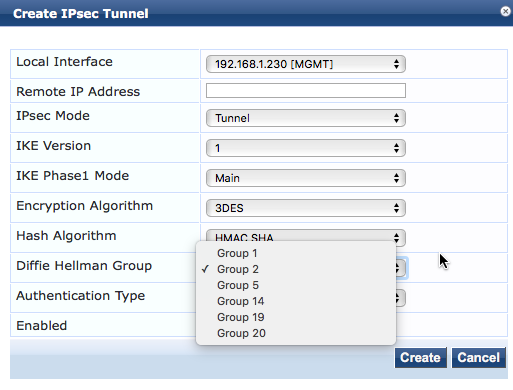
IKE uses Diffie-Hellman key exchange to derive a shared secret for the IPsec peers. The Diffie-Hellman Group selected should reflect the sensitivity of the information being encrypted. Higher group numbers are more secure. Groups 19 and 20 are Suite-B elliptical curve algorithms.
 INFO
INFO
Group 1 is no longer considered secure and should not be used
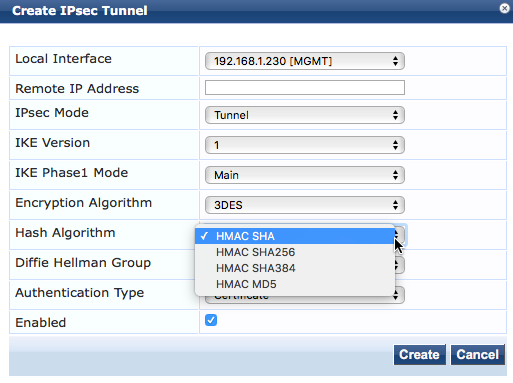
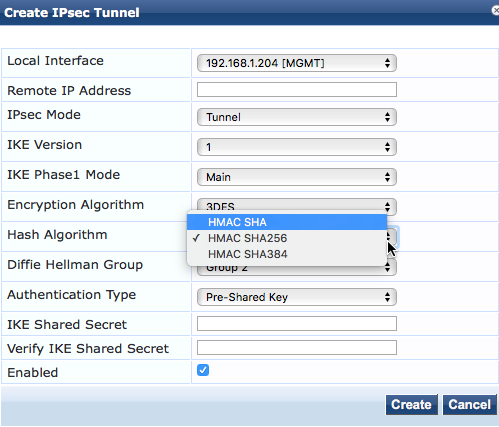
If IKE version 1 has been selected the authentication algorithms available are;
Non FIPS Mode FIPS Mode
If IKE version 2 was selected the PRF variants are used
Non FIPS Mode FIPS Mode
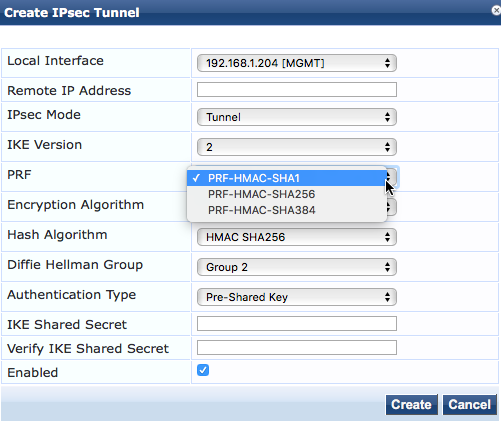
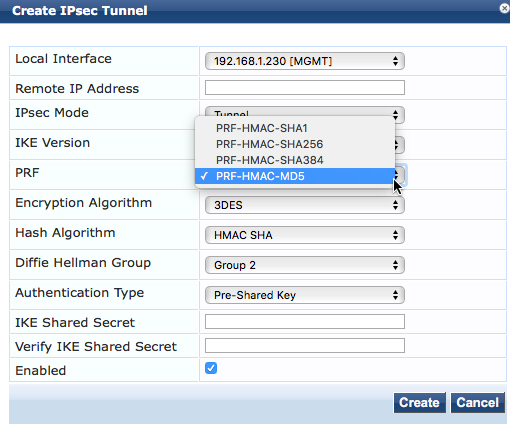
MD5 has been shown to have collision weaknesses; different inputs may produce the same output. This may make it unsuitable for authentication hashing. MD5 hashing is disabled in FIPS mode.
The encryption algorithms available are;

Longer key lengths are more secure but require more compute power to encrypt and decrypt the data. AES (Advanced Encryption Standard) 256 provides the highest level of protection.
Pre-Shared Key Authentication Example
Configure both of the IPsec peers

Once the Security Association is negotiated and the connection established the status can be viewed by clicking on the Action icon

If the connection does not come up

It may be necessary to stop and restart the IP Service on both peers

Certificate Based Authentication Example
In certificate based authentication the IPsec peers exchange X509 certificates during the IKE protocol SA negotiation. The certificate contains the Pubic key of the IPsec peer and must be issued (signed) by a certificate authority the receiving peer trusts. The issuing certificate authority must be in the receiving peer’s “Trust List”
The HTTPS server certificate is used for IPsec connections.

Since the default CPPM server certificate is self signed it will not be trusted by the other IPsec peer. In this example we will use publicly signed certificates.

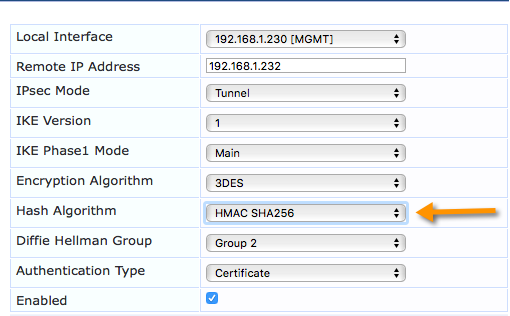
Configure the IPsec peers
INFO
The Hash Algorithm must match the Signature Algorithm in the Certificate.

Verify that the IPsec connection is established

If certificates issued by a Public Certificate Authority are not available the Onboard CA can be used to issue the certificates.
In Onboard create a new Certificate Authority

Make sure the Digest Algorithm is supported by the IPsec peers
After the CA is created select edit Certificate Authority

Select a Digest Algorithm that the IPsec Peers support.
After the new CA is configured correctly generate a Certificate Signing Request (CSR) on each of the IPsec Peers.

Upload the Certificate Signing Requests to the Certificate Authority.


Select Certificate Type: Trusted Certificate and Issue certificate immediately.
From the Manage Certificate screen select certificate type: Trusted and Export the Certificates for the IPsec peers

These will be uploaded as the HTTPS certificate for each Peer.
Next select Certificate type: Certificate Authority and export the Root and Intermediate (signing) certificates

These will be added to the trust list on each Peer.
Configure the IPsec peers for certificate based authentication

ClearPass to Aruba Controller
The following configuration will establish an IPsec tunnel between the Aruba Controller and the ClearPass Server. Since IPsec is Layer-3, this will work whether the two devices are on the same network or different networks, so long as the networks between the two devices allow IPsec.

Preshared Keys
ClearPass Configuration

Aruba Controller Configuration
The following procedure will describe how to setup the Controller-side of the IPsec tunnel.
-
Log in to the Aruba Controller and go to ‘Configuration > Advanced Services – VPN Services’ and go to the ‘Site-to-Site’ tab
-
Under ‘IPsec Maps’, click ‘Add’
-
Fill in the appropriate information to meet the IPsec settings required. The image below shows both a PSK-based IKEv1 AES256, as well as a PSK-based IKEv2 AES256 IPsec tunnel on the controller. Note that for IKEv2, the destination subnet mask is different than for IKEv1. This may be corrected in a later version of AOS.
-
Once done, click the ‘Done’ button, and then ‘Apply’ at the bottom of the page, and then save the configuration.


ClearPass IPsec Troubleshooting
INFO
For IKEv2, to address a transport-mode issue, the destination subnet mask on the controller for a single host needs to be set at 255.255.255.254’ to work properly. This may be corrected in a later version of AOS.
Verify IPsec Connection – Controller
Log in to the controller’s CLI and run the following commands:
-
Show crypto isakmp sa
-
Show crypto ipsec sa

Troubleshooting
ClearPass
There are three primary logs that provide valuable troubleshooting information
-
PolicyManagerLogs 🡪 Platform-ipsec
-
SystemLogs 🡪 ipsec-conn.txt
-
SystemLogs 🡪 Var 🡪 Log 🡪 messages
Ipsec-conn.txt
This file shows the IPsec Security Associations
Listening IP addresses:
192.168.1.204
Connections:
ipsec-3025: 192.168.1.204…192.168.1.205 IKEv1, dpddelay=30s
ipsec-3025: local: [OU=Domain Control Validated, CN=cp.dpblab.net] uses public key authentication
ipsec-3025: cert: “OU=Domain Control Validated, CN=cp.dpblab.net”
ipsec-3025: remote: uses public key authentication
ipsec-3025: child: dynamic === dynamic TUNNEL, dpdaction=restart
Security Associations (1 up, 0 connecting):
ipsec-3025[5]: ESTABLISHED 54 minutes ago, 192.168.1.204[OU=Domain Control Validated, CN=cp.dpblab.net]…192.168.1.205[OU=Domain Control Validated, CN=cp1.dpblab.net]
It also shows the Certificate used for the connection. In this example the certificate for cp.dpblab.net was issued by the public CA godaddy
List of X.509 End Entity Certificates:
altNames: cp.dpblab.net, www.cp.dpblab.net
subject: “OU=Domain Control Validated, CN=cp.dpblab.net”
issuer: “C=US, ST=Arizona, L=Scottsdale, O=GoDaddy.com, Inc., OU=http://certs.godaddy.com/repository/, CN=Go Daddy Secure Certificate Authority - G2”
serial: e6:a3:7f:bb:ce:4b:1d:68
validity: not before Mar 19 15:38:38 2015, ok
not after Dec 13 11:38:03 2015, ok (expires in 23 hours)
pubkey: RSA 2048 bits, has private key
keyid: 96:2f:67:06:7d:49:9e:15:6a:69:92:f4:b0:e2:3d:34:cd:6b:73:09
subjkey: ef:ca:0f:73:46:14:a5:f6:c9:c5:ab:f2:ce:04:d6:2c:3f:6d:a6:16
authkey: 40:c2:bd:27:8e:cc:34:83:30:a2:33:d7:fb:6c:b3:f0:b4:2c:80:ce
altNames: cp1.dpblab.net, www.cp1.dpblab.net
subject: “OU=Domain Control Validated, CN=cp1.dpblab.net”
issuer: “C=US, ST=Arizona, L=Scottsdale, O=GoDaddy.com, Inc., OU=http://certs.godaddy.com/repository/, CN=Go Daddy Secure Certificate Authority - G2”
serial: ba:a7:70:4d:8e:22:32:cd
validity: not before Oct 08 16:10:38 2015, ok
not after Oct 08 16:10:38 2016, ok
pubkey: RSA 2048 bits
keyid: aa:03:69:ea:a7:bd:c0:84:cb:e0:ac:15:da:75:df:ba:77:a5:99:68
subjkey: d7:26:a0:11:8d:90:88:ac:ec:66:cd:c7:02:2a:6c:c9:be:99:16:70
authkey: 40:c2:bd:27:8e:cc:34:83:30:a2:33:d7:fb:6c:b3:f0:b4:2c:80:ce
The next section is a list of Trusted certificate Authorities; this is from the ClearPass trust list. The CA that signed the IPsec Peers certificate must be in the trust list
List of X.509 CA Certificates:
subject: “C=US, ST=Arizona, L=Scottsdale, O=GoDaddy.com, Inc., OU=http://certs.godaddy.com/repository/, CN=Go Daddy Secure Certificate Authority - G2”
issuer: “C=US, ST=Arizona, L=Scottsdale, O=GoDaddy.com, Inc., CN=Go Daddy Root Certificate Authority - G2”
serial: 07
validity: not before May 03 03:00:00 2011, ok
not after May 03 03:00:00 2031, ok
pubkey: RSA 2048 bits
keyid: b4:55:50:14:83:45:1f:ee:8c:a0:a1:0c:f5:af:de:3a:4c:5e:11:59
subjkey: 40:c2:bd:27:8e:cc:34:83:30:a2:33:d7:fb:6c:b3:f0:b4:2c:80:ce
authkey: 3a:9a:85:07:10:67:28:b6:ef:f6:bd:05:41:6e:20:c1:94:da:0f:de
subject: “C=US, ST=Arizona, L=Scottsdale, O=GoDaddy.com, Inc., CN=Go Daddy Root Certificate Authority - G2”
issuer: “C=US, O=The Go Daddy Group, Inc., OU=Go Daddy Class 2 Certification Authority”
serial: 1b:e7:15
validity: not before Jan 01 02:00:00 2014, ok
not after May 30 03:00:00 2031, ok
pubkey: RSA 2048 bits
keyid: 21:0f:2c:89:f7:c4:cd:5d:1b:82:5e:38:d6:c6:59:3b:a6:93:75:ae
subjkey: 3a:9a:85:07:10:67:28:b6:ef:f6:bd:05:41:6e:20:c1:94:da:0f:de
authkey: d2:c4:b0:d2:91:d4:4c:11:71:b3:61:cb:3d:a1:fe:dd:a8:6a:d4:e3
subject: “C=US, O=The Go Daddy Group, Inc., OU=Go Daddy Class 2 Certification Authority”
issuer: “C=US, O=The Go Daddy Group, Inc., OU=Go Daddy Class 2 Certification Authority”
serial: 00
validity: not before Jun 29 13:06:20 2004, ok
not after Jun 29 13:06:20 2034, ok
pubkey: RSA 2048 bits
keyid: ee:e5:9f:1e:2a:a5:44:c3:cb:25:43:a6:9a:5b:d4:6a:25:bc:bb:8e
subjkey: d2:c4:b0:d2:91:d4:4c:11:71:b3:61:cb:3d:a1:fe:dd:a8:6a:d4:e3
authkey: d2:c4:b0:d2:91:d4:4c:11:71:b3:61:cb:3d:a1:fe:dd:a8:6a:d4:e3
subject: “C=US, ST=California, L=Sunnyvale, O=Aruba Networks, CN=ClearPass Onboard Local Certificate Authority (Signing), E=dab@labnet.com”
issuer: “C=US, ST=California, L=Sunnyvale, O=Aruba Networks, CN=ClearPass Onboard Local Certificate Authority, E=dab@labnet.com”
serial: 0f
validity: not before Oct 13 11:32:54 2015, ok
not after Oct 13 12:02:54 2025, ok
pubkey: RSA 2048 bits
keyid: 69:4d:73:f1:6a:ec:2e:f5:a8:6d:e5:51:08:eb:d8:92:f2:de:14:ac
subjkey: 5d:39:61:4f:eb:3d:18:7d:21:9d:33:2c:53:0b:1b:cc:f6:06:20:8d
authkey: b5:42:f6:ed:db:d5:1f:c0:3a:c3:7f:b0:7d:09:c8:42:46:c4:b4:7d
Platform-ipsec
ipsec-3024[3] to 192.168.1.205
no private key found for ‘CN=cp.dpblab.net’
configuration uses unsupported authentication
tried to check-in and delete nonexisting IKE_SA
establishing connection ‘ipsec-3024’ failed
This shows a mismatch between the authentication algorithm negotiated by the IPsec peers and the authentication (signing) algorithm contained in the certificate
Messages
Dec 12 08:53:10 cp charon: 08[IKE] initiating Main Mode IKE_SA ipsec-3024[2] to 192.168.1.205
Dec 12 08:53:10 cp charon: 08[IKE] IKE_SA ipsec-3024[2] state change: CREATED => CONNECTING
Dec 12 08:53:10 cp charon: 08[IKE] no private key found for ‘CN=cp.dpblab.net’
Dec 12 08:53:10 cp charon: 08[CFG] configuration uses unsupported authentication
Dec 12 08:53:10 cp charon: 08[MGR] tried to check-in and delete nonexisting IKE_SA
This shows a mismatch between the authentication algorithm negotiated by the IPsec peers and the authentication (signing) algorithm contained in the certificate
Dec 10 10:07:29 cp charon: 01[CFG] selected proposal: IKE:AES_CBC_192/HMAC_SHA1_96/PRF_HMAC_SHA1/MODP_1024
Dec 10 10:07:29 cp charon: 01[IKE] reinitiating already active tasks
Dec 10 10:07:29 cp charon: 01[IKE] ISAKMP_VENDOR task
Dec 10 10:07:29 cp charon: 01[IKE] MAIN_MODE task
Dec 10 10:07:29 cp charon: 01[ENC] generating ID_PROT request 0 [ KE No NAT-D NAT-D ]
Dec 10 10:07:29 cp charon: 01[NET] sending packet: from 192.168.1.204[500] to 192.168.1.205[500] (244 bytes)
Dec 10 10:07:29 cp charon: 14[NET] received packet: from 192.168.1.205[500] to 192.168.1.204[500] (244 bytes)
Dec 10 10:07:29 cp charon: 14[ENC] parsed ID_PROT response 0 [ KE No NAT-D NAT-D ]
Dec 10 10:07:29 cp charon: 14[IKE] reinitiating already active tasks
Dec 10 10:07:29 cp charon: 14[IKE] ISAKMP_VENDOR task
Dec 10 10:07:29 cp charon: 14[IKE] MAIN_MODE task
Dec 10 10:07:29 cp charon: 14[ENC] generating ID_PROT request 0 [ ID HASH ]
Dec 10 10:07:29 cp charon: 14[NET] sending packet: from 192.168.1.204[500] to 192.168.1.205[500] (76 bytes)
Dec 10 10:07:29 cp charon: 12[NET] received packet: from 192.168.1.205[500] to 192.168.1.204[500] (76 bytes)
Dec 10 10:07:29 cp charon: 12[ENC] parsed ID_PROT response 0 [ ID HASH ]
Dec 10 10:07:29 cp charon: 12[IKE] IKE_SA ipsec-3022[1] established between 192.168.1.204[192.168.1.204]…192.168.1.205[192.168.1.205]
Dec 10 10:07:29 cp charon: 12[IKE] IKE_SA ipsec-3022[1] state change: CONNECTING => ESTABLISHED
This shows a successful connection
Controller
Turn on debugging
config t
logging level debug security process l2tp
logging level debug security process crypto
logging level debug security subcat vpn
logging level debug security subcat IKE
Show Security Log
Then, while it is connecting, do a “show log security 50”
Jan 22 13:37:50 :103063: <DBUG> |ike| 192.168.1.206:500-> ike_phase_1_send_KE_NONCE 192.168.1.206
Jan 22 13:37:50 :103063: <DBUG> |ike| GetFirstMatchIsakmpPSK: entering
Jan 22 13:37:50 :103063: <DBUG> |ike| mask FFFFFFFF, ip C0A801CE, key_ip C0A801CE
Jan 22 13:37:50 :103060: <DBUG> |ike| ike_auth.c:ike_auth_get_key:603 Found isakmp policy for peer 192.168.1.206 client:no
Jan 22 13:37:50 :103063: <DBUG> |ike| ike_phase_1_post_exchange_KE_NONCE IV len:16
Jan 22 13:37:50 :103063: <DBUG> |ike| ike_phase_1_post_exchange_KE_NONCE done 192.168.1.206 g_x_len:128 skeyid_len:20
Jan 22 13:37:50 :103063: <DBUG> |ike| 192.168.1.206:500-> message_parse_payloads: invalid next payload type <Unknown 113> in payload of type 5
Jan 22 13:37:50 :103060: <DBUG> |ike| 192.168.1.206:500-> message.c:message_drop:2886 Message drop from 192.168.1.206 port 500 due to notification type INVALID_PAYLOAD_TYPE
Jan 22 13:37:50 :103053: <INFO> |ike| Drop message from 192.168.1.206 due to invalid IKE shared-secret
Jan 22 13:37:54 :103063: <DBUG> |ike| 192.168.1.206:500-> message_parse_payloads: invalid next payload type <Unknown 113> in payload of type 5
Jan 22 13:37:54 :103060: <DBUG> |ike| 192.168.1.206:500-> message.c:message_drop:2886 Message drop from 192.168.1.206 port 500 due to notification type INVALID_PAYLOAD_TYPE
Jan 22 13:37:54 :103053: <INFO> |ike| Drop message from 192.168.1.206 due to invalid IKE shared-secret
In this example the Peers shared secret does not match
Feedback
Was this page helpful?
Glad to hear it!
Sorry to hear that.