Central Configuration Model
HPE Aruba Networking Central provides comprehensive, cloud-based configuration for switches, gateways, and access points in a single pane of glass.
In Central’s configuration model, objects contain the building blocks of network configuration. These objects are applied to devices using a flexible, directory-style structure that can accommodate small organizations to large enterprises. This approach ensures consistency and reduces administrative overhead by aggregating blocks of configuration across a large number of devices and device types, while maintaining the ability to customize configuration for individual devices or groups of devices.
This chapter provides an overview of the process to easily apply configuration to devices and achieve a consistent, error-free network deployments.
Table of contents
Configuration Objects
Central stores general device configuration in element profiles (WLANs, VLANs, DNS servers, etc.) and policy-related configuration in roles and security policies. Each object type consists of one or more parameters that are pushed as a block of configuration to network devices.

Configuration objects are stored in Central’s Library, which is a repository of all shared configuration components in a Central account. Objects defined in Central’s Library represent potential configuration. Central pushes configuration to network devices only after an object is assigned a device function and a scope, as described later in this chapter.
The Library is accessible at the top of the Configuration Overview menu.

Element Profile
Profiles contain sets of configuration focused on specific subject areas, defined by profile type. Examples of profile types include WLAN, Authentication Server, VLAN, and DNS Server. A single profile can be applied across multiple device types and operating systems. The configuration values contained in a profile represent network operator intent and are generally independent of device-specific implementation.
For example, an administrator can create a DNS Server profile named OWL-DNS to specify a list of DNS server IP addresses. The profile captures the operator’s intent to configure a common set of DNS servers in an operating-system-agnostic parameter list. When the profile is applied to different device types, Central configures each device based on its individual operating system’s requirements.
Note: When a profile type contains a subset of configuration parameters that are applicable only for one specific device type, the profile organizes the configuration elements using appropriate heading such as Switch Parameters. This allows a single profile to enable device-specific features while still applying common configuration parameters across multiple device types. Additionally, some element profiles apply only to a single device type that supports a specialized function. For example, the WLAN profile can only be applied to campus access points and gateways.
The Profiles tab is selected by default in Central’s horizontal configuration menu. Central organizes profile types by configuration topic areas in multi-page tiles. For example, wireless related profile types such as WLAN and RF are grouped in the Wireless tile. Individual pages within a tile are accessible by clicking the dot at the bottom of the tile. Click Manage to display all element profile types grouped in the tile category.

Click a profile type to display a list of currently defined profiles and a Create Profile button. A context path displays below the menu. Use the search field to find existing profiles quickly.

Click an individual profile to display its configured parameters.

Role
A role represents a group of users or devices, assigned when connecting to the network. Users and devices typically are grouped using a common set of role-based security requirements. The roles are then used to define network security policies.
Roles are described in the Central Policy Configuration guide.
Security Policy
A policy is a set of rules that governs permitted behavior on the network. Central policy rules specify allowable communication between roles, applications, and network resources.
Both role and security policy objects can be managed from the Roles & Policies tab.

Security policy is described in the Central Policy Configuration guide.
Applying Configuration
Configuration objects are assigned device functions to limit which device types and switch roles receive configuration, and scopes to govern which devices receive configuration based on organizational structure and administrator-defined groups.
This approach offers network operators the following benefits:
- A powerful approach to standardizing configuration.
- An efficient method to distribute configuration to a large number of devices.
- The ability to ensure that configuration is applied only to devices intended to receive it.
- Customization of configuration based on organizational structure, network function, or individual device requirements.
Device Functions
Device functions are assigned to devices during the on-boarding process described in the Central Readiness chapter. Functions for gateways and campus access points are auto-assigned. Switches can be assigned to the Access Switch, Aggregation Switch, or Core Switch device functions.
Device functions enable administrators to control the assignment of profiles based on a device’s role in the network. For example, an OSPF profile might be applied to core and aggregation switches, but not assigned to access switches or mobility gateways.
The device functions used in this guide are:
- Campus Access Point
- Mobility Gateway
- Core Switch
- Aggregation Switch
- Access Switch
Central’s online help provides a full list of device functions and descriptions.
When viewing profiles in the Library or within a specific scope, the Device Function menu automatically filters the profile types applicable to the selected function.

Scopes
Central defines five configuration scopes to further control how configuration is applied to devices. Four scopes are organized in a top-down hierarchy similar to common directory structures, while the fifth enables grouping devices based on administrator preference.
Hierarchy-Based Scopes
The hierarchy-based scopes are designed to align to organizational structure. The following illustration shows the four scopes in Central’s top-down hierarchy.

Objects assigned to higher levels propagate their configuration downward using inheritance. This provides an intuitive method of applying configuration to large numbers or sets of devices, while also providing customization at natural delineation points in the organization.
The Global scope applies configuration consistent across all elements of the organization. Examples include company-standard WLANs, named VLANs, roles, and policies. When configuration is assigned to the Global scope, Central applies the associated configuration to all site collections, sites, and devices.
Site Collections are not mandatory, but enable large organizations to apply common configuration across regions or business units (such as “North America” or “retail stores”). This makes it easy to push regional or business–unit–specific settings, such as RADIUS servers for all branches in a single country.
Sites typically represent a specific physical location, such as a branch, warehouse, or headquarters. Profiles with site-specific configurations are assigned to a site scope. Examples include site-specific VLANs, local WLANs, or the local timezone.
Each individual access point, gateway, and switch is located in the Device scope. Configuration made in this scope is assigned directly to an individual device, which provides full customization of parameters such as hostnames and IP address assignments.
Device Groups
Using Device Groups, administrators can logically group any set of devices based on other affinities, such as unique RF settings or selective WLAN assignments. Devices assigned to a group may be part of a single site or may comprise devices from multiple sites. This function is analogous to AP groups in earlier AOS management solutions, but now applies to all device types managed by Central.
Assigning a configuration object to a device group provides the flexibility to standardize configuration for a range of devices based on administrator preferred criteria, outside the confines of organizational structure.
Note: Assignment of devices to a Device Group is mandatory at the time of this writing, as a part of the onboarding process. Applying configuration to Device Groups is optional.
Understanding Inheritance
Inheritance governs which Central configuration objects are applied to devices based on automated propagation through scopes and resolves conflicts by applying a preference to each scope layer.
Configuration Object Propagation
Objects assigned at one scope are propagated to additional scopes using the following two paths:
- Global → Site Collections → Site → Device
- Device Groups → Device
Because objects can be assigned to multiple scopes and two distinct paths propagate object configuration to devices, it is possible for configuration conflicts to occur. Central’s inheritance uses precedence, covered later in this chapter, to resolve propagation conflicts in a predictable manner.
Hierarchy-Based Scope Propagation
Most Central configuration is applied using a top-down model: object settings assigned at a higher level scope cascade down to lower level scopes.
The default propagation for assignment at each hierarchy-based scope is described below, followed by an example illustration. In each diagram, a WLAN profile is assigned to a scope, and arrows indicate the propagation of the profile through additional scopes. The APs receiving the configuration are highlighted in the same color as the WLAN profile.
- Global Scope Assignment: An object assigned to the Global scope is automatically propagated to every site collection, site, and device in the organization. Objects are propagated directly to sites that are not members of an optional site collection.

- Site Collection Assignment – An object assigned to a site collection is propagated to only its member sites and devices in those sites.

- Site Assignment – An object assigned to a site applies to only devices assigned to the individual site.

- Device Assignment – An object assigned to an individual device applies only to that device. A single profile can be assigned ad hoc to multiple devices in cases where a Device Group is not applicable.

Device Group Propagation
Device Groups provide a flexible method of grouping devices independent of organizational structure. Devices can be grouped within a single site or across multiple sites based on common configuration requirements, such as office APs or warehouse APs, similar to AP Groups in AOS 6 and 8.
The example below shows APs assigned to different device groups based on the wireless user density in the AP’s location: HD-APs (high-density access points) and UHD-APs (ultra-high-density access points). Using this strategy, RF profiles that meet wireless user density requirements are assigned to APs across multiple sites.

Additive Profile Propagation
Roles, security policies, and some element profiles represent one entry in a configuration list. For example, each WLAN and VLAN profile represents one instance in the list of WLANs and VLANs on a device. This provides administrative flexibility to assign WLAN, VLAN, and other additive profiles at multiple scope layers, with all assignments propagating to those devices.
The diagram below illustrates assigning a unique WLAN profile at each scope, followed by a summary of their application to devices using an additive process.

The WLANs are applied as follows:
| Inherited WLANs | |
|---|---|
| Branch1 & Branch2 APs | CONF_ROOM (from HD-APs device group) OWL_EMPLOYEE (from Global) BRANCH_GUEST (from BRANCHES site collection) CONF_ROOM (from HD-APs device group) |
| Branch3 APs (white APs) | OWL_EMPLOYEE (from Global) BRANCH_GUEST (from BRANCHES site collection) BRANCH3_CONTRACTOR (from Branch3 site) |
| Branch3 Test AP (purple AP) | OWL_EMPLOYEE (from Global) BRANCH_GUEST (from BRANCHES site collection) BRANCH3_CONTRACTOR (from Branch3 site) VOICE_TEST (from specific device assignment) |
Note: Only a subset of profile objects are propagated using the additive process. Most profiles represent a complete configuration block and multiple profiles applied at different scopes are treated as representing the same configuration. For example, a DNS Server profile represents the complete list of DNS servers applied to a device. DNS Server profiles applied at multiple scopes are not treated using an additive process, and only one of the DNS Server profiles is selected using the rules of precedence described below.
Configuration Precedence
As described in the previous section, different objects of the same type can be assigned to multiple scopes. This gives administrators flexible configuration control, but can result in a configuration conflict, when two objects configure the same parameters on a device. Central resolves conflicts by assigning a preference to each scope. The object with the greatest preference, or weight, contains the configuration that is pushed to a device.
The order of precedence is: Device > Device Group > Site > Site Collection > Global
The following diagram illustrates both object propagation through Central scopes and a visualization of precedence weight applied to objects assigned at each scope.

In the hierarchy-based scopes, the closer a scope is to a device, the more weight it carries. If two profiles conflict, the object assigned to the scope closest in relation to the device are used.
Although Device Groups are positioned outside the hierarchy-based scopes with respect to propagation, they can be visualized as sitting between Sites and Devices from the perspective of precedence. Objects assigned to a Device Group override all hierarchical scope assignments for a device, except for profiles applied directly at the device level.
Device-level configuration always outweighs all other scopes when a configuration conflict is present.
When a conflict occurs, Central applies only the configured parameters defined in the selected profile or role. Central does not evaluate individual parameter values for conflict.
The following diagram illustrates the use of precedence to resolve conflicts for several DNS Server profiles applied at multiple scopes. The Base_DNS profile assigned to the Global scope propagates to the three Corp sites. The Branch_DNS profile assigned to the Branches site collection blocks inheritance of the Base_DNS profile, because it has higher precedence. The Branch_DNS profile is inherited by all branch devices, except devices assigned to the PCI device group, because device groups have higher precedence than a site collection.

Configuration Customization
Although a key principle of inheritance is to resolve propagation conflicts, it is better understood as a powerful administrative tool for customizing configuration. Two primary methods are used to apply inheritance.
- Assign a profile to a scope that targets the intended devices for configuration. The WLAN profile example above illustrates the propagation of WLANs to targeted APs based on scope assignment.
- Overwrite inherited configuration by assigning a profile to a scope with a higher precedence. The DNS Server example above assigns a different set of DNS servers based on scope assignment and precedence.
The second strategy requires some additional detail. In order for one configuration object to overwrite an inherited object, the two objects must represent the same device configuration.
Most profiles in Central are applied to devices as an atomic unit: the profile parameters are applied as a set and treated as a single block of configuration. Example profiles include DNS Server, NTP Server, OSPF, BGP, and STP. These profiles always represent the same configuration, and only one profile can be applied to a device. The inheritance process described above selects the profile with the highest precedence when a device belongs to multiple scopes with the same profile type applied. The DNS Server profile example applies inheritance in this manner.
Unlike profiles that are treated as an atomic unit, additive profiles only represent a portion of configuration for the configuration subject. Examples include WLAN, VLAN, and Authentication Server profiles. Each WLAN, VLAN, and authentication server requires its own profile, and a set of profiles for each type is required to deliver the intended configuration. The profiles are logically added together when pushing configuration to a device.
Additive profiles also can be overwritten to customize settings by assigning a new profile with the same profile name or ID to a scope with higher precedence. It is best practice to use local profile overrides, discussed below, when a profile is additive.
Note: WLAN profiles have additional considerations. As an additive profile, the name of WLAN profiles must match for Central to consider the profiles as representing the same configuration block. Since the WLAN profile’s Name parameter and ESSID Name parameter are not required to match, it is possible to assign multiple profiles to a device for the same advertised SSID. For example, the profiles named Guest and Branch-Guest are considered two distinct profiles by Central, and they do not conflict. However, it is possible that both WLAN profiles assign the same value to the ESSID Name parameter, resulting in a single device inheriting multiple WLAN profiles for the same SSID. Using profile overrides helps avoid this issue by creating profiles with the same profile name by default.
Shared and Local Objects
Element profiles and roles can be shared or local, which determines if an object is reusable across multiple contexts and where the object is stored in Central.
Inheritance and precedence are applied in the same manner to both shared and local objects.
Shared Objects
By default, most configuration objects are shared when created. This means they are reusable and can be applied at any scope. Shared objects are stored in Central’s configuration Library. The Library’s purpose is simply to store reusable configuration.
Note: The only configuration objects not shared by default are scope-specific profiles.
Shared profiles, roles, and policies can be created in the Library context or in any scope context. Objects created in the Library context represent potential configuration. An object’s configuration is applied to devices only after it is assigned at least one scope and device function.
By default, an object created at a specific scope is added automatically as a shared profile to the Library and assigned the scope and device function from the context in which it was created. The device function context is set from the current value of the Device Function filter. Additional scope and device function assignments can be made to the profile after its initial creation.
Local Objects
Element profiles and roles can be created as local configuration objects. Local objects are assigned to a specific scope and are intentionally not propagated to the Library, so they cannot be applied to additional scopes. Local objects are stored in a separate database from the Library.
There are two primary purposes for creating a local profile:
Define a non-reusable profile that cannot be assigned to other contexts. For example, a WLAN that should exist only at one site can be created as a local profile assigned to the individual site, which prohibits propagation of the WLAN profile to the Library and therefore cannot be applied to other sites.
Assign override values to an inherited object to customize configuration for a site or a device. Overrides are most often used to apply device-specific configuration.
Because local profiles are not stored in the library, this is the only method of blocking inheritance for an additive profile, which requires both profiles to use the same name or ID to reference the same configuration block. The Library cannot contain two profiles with the same name.
A local profile or role is created by checking Create as a local profile on a new object or Save as local profile on an inherited object. The checkbox is located at the top of the first page of any profile or role configuration window.

Note: A new local profile must be created in a specific scope context.
Profile Overrides
When a local profile is branched from an inherited profile by checking the Save as local profile checkbox, it is called an override. The new local profile is considered distinct from its parent, and it is governed by the same inheritance rules as any other profile. The new override profile’s initial values are the same as the original profile, but its parameter values can be modified further to provide customized control at a specific scope.
Profile overrides are applied most often to define device specific values, such as IP addresses.
Note: Profile overrides are recommended when customizing additive objects. This avoids ambiguous inheritance in the Central UI, where a single device may appear to inherit multiple profiles for the same configuration.
Administrators can remove overrides using two methods:
- Select Clear Overrides from the ••• menu at the right of the profile name.
- Delete the local profile.
Profile overrides are supported in all scopes of the hierarchy, and system-generated default profiles also support overrides.
The example below illustrates creating a local profile to change inherited configuration. An RF profile named Standard_Branch is applied to the site collection named Branches. This profile is inherited by Branch1 and Branch2. The profile override created at Branch3 initially contains the same values as the inherited profile, including the profile name. After an administrator applies customized values to the local profile, all devices at Branch3 inherit the new local profile values, because a Site profile has higher precedence than a Site Collection.

Scope-Specific Profiles
Some element profiles must be applied at specific scope layers and are visible only at scopes where they can be applied. They do not appear and are not configurable in the Library. The inheritance rules described above apply to scope-specific profiles.
Some examples of scope-specific elements include:
- AirMatch Service: Global scope
- Gateway Clustering: Device Group scope
- VSX: Site and Device Group scopes
- VSF: Site scope
- System Information (hostname): Device scope
- Interface configuration: Device scope
Config Sync and YANG Models
When a profile is applied, the Central configuration engine uses Config Sync to push changes to appropriate devices. This process uses YANG models, which are data modeling languages used to define network configurations. Central uses YANG to ensure that the configuration is pushed to the device as a structured data model, rather than as a set of CLI commands. This method is more robust and less prone to errors than simply pushing text-based CLI commands.
Profile Best Practices
This section outlines best practices for specific profiles that may be leveraged in this guide’s configuration model.
VLAN
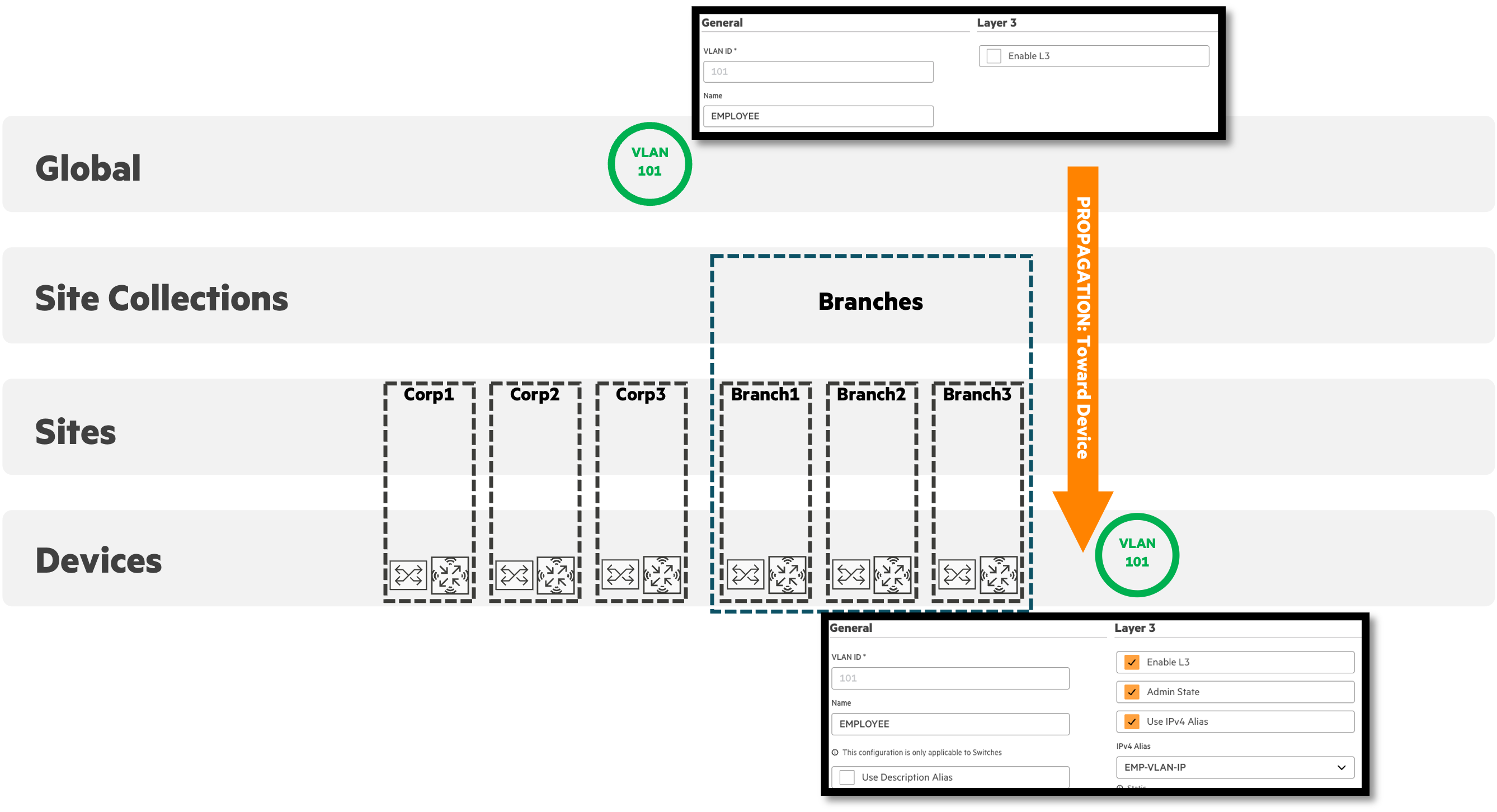
When defining a VLAN, it can be created as a Layer 2 VLAN or a Layer 3 VLAN via the “Enable L3” checkbox.
A VLAN profile is often defined higher in the hierarchy, such as Global or Site Collection, so that devices in child scopes inherit it. If an override is needed, create the VLAN as Layer 2 at the higher scope, then enable Layer 3 as an override at the lower scope for the devices that need it.
The image below illustrates the EMPLOYEE VLAN (101) defined as Layer 2 only at the Global scope, propagating down through Site Collections, Sites, and Devices. Layer 3 is enabled only as an override at the device that owns routing for that VLAN.
Caution: Changing a VLAN profile’s Layer 2/Layer 3 type more than once along the inheritance path can cause configuration inconsistencies. For example, creating VLAN 100 as Layer 2 at Global, changing it to Layer 3 at Site, then changing it back to Layer 2 at Device scope is not recommended.
Practical Example
The following example illulstrates how Central’s hierarchy-based scopes work together in an enterprise environment.
In this example, the company’s network spans a corporate headquarters in Barcelona, two distribution centers in Milan and Rotterdam, and three retail stores located in London, Madrid, and Paris.
Each configuration scope builds on the previous one, ensuring consistency at scale while maintaining flexibility at the regional and site levels.
Global Scope - Corporate WLAN
At the Global scope, the IT team defines a common corporate WLAN (CorpNet) used across all sites.
Because configuration applied at Global is inherited by all Site Collections, Sites, and Devices, this ensures that every AP across the enterprise advertises the same secure WLAN with consistent access policies.

Site Collection - Customer Role Configuration
Next, the Retail Site Collection defines additional configuration for store environments. A new VLAN is created here to segment customer guest traffic in retail stores. This VLAN is inherited by all sites and devices within the Retail site collection - in this case, the London, Madrid, and Paris stores - without affecting the corporate distribution environments.

Site Scope - VLAN Configuration for Milan Distribution Center
At the Milan Site, a local access switch VLAN configuration is defined to segment wired clients specific to that site. The VLAN 5 configuration created here is inherited by all access switches in the Milan Distribution Center, ensuring consistent tagging and traffic separation within that location.
This allows regional teams to maintain control of their local addressing and segmentation policies while still inheriting global WLANs and roles.

Device-Level and Library Integration - Test WLAN Replication
IT engineers create a pilot WLAN (ScanNet) on a single AP in Rotterdam to validate connectivity for new handheld scanners being staged and tested.

Device Groups
Device Groups provide a horizontally scalable way to apply configuration across similar device types, regardless of their physical locations. In this example, three RF profiles are defined at the Device Group level:
- HD Office APs: Optimized for dense office areas using 20-40 MHz channels.
- UHD Office APs: Tuned for ultra-high-density spaces requiring greater client capacity.
- Warehouse APs: Designed for large open areas such as distribution centers, providing extended coverage and stable connectivity.
Each Device Group’s configuration is inherited by all APs assigned to that group - across sites in Barcelona HQ, Milan, and Rotterdam - ensuring consistent RF behavior enterprise-wide while allowing per-device overrides when needed.

Conclusion
Central’s configuration model provides a structured method to balance consistency and flexibility.
Administrators can use scopes and device functions to reduce duplication and simplify management. Device groups provide targeted control across sites, while device-level overrides ensure that unique requirements can be met without impacting the broader design.
This approach results in a configuration model that is easier to maintain, scales predictably, and provides clear visibility into where and how configuration is applied.